How to set the Geo-fence coordinates for the initial set up?
Setting up Geo-fence coordinates is a one-time process. The admin can save multiple Geo-location coordinates as to their requirement. He can also delete the saved location if not needed.
Steps:
1. Login to https://sanarp.com/Users/login
2. Open this link – https://sanarp.com/Attendance/addcordinate
3. A page will appear with the Geo coordinates.
4. Put the Location name and click on “Save Location” to save it.
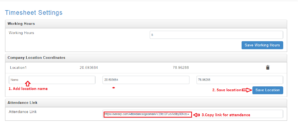
5. Copy the Attendance Link generated/ QR code.
To mark attendance,
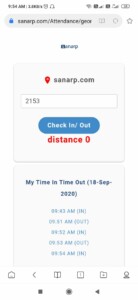
- Click on link or scan the QR code in mobile browser.
- Once done, your last Check-in time will display.
- If you are out of the Geo-fence, it will show “You are out of range” notification.
- To mark the attendance, go within the Geo-fence, enter your Emp No & click Check IN/OUT button.
- Once done, the IN/ OUT records can be seen at Timesheet (for Admin) and Sanarp mobile app for individual staff
Note: Ensure the GPS of the mobile is ON for higher accuracy.