
How to Remove Employees from a Group?
To remove employees from Group, follow the below steps –
Step1: Login to www.Sanarp.com
Step2: Navigate to HRM -> Groups
Step3: Click on the Group Name. Refer Image1
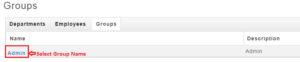 Image1
Step4: Click on the “X” symbol beside the Name to remove the employee.
Step5: After removing, click on “Update” button. On successful update, the employee name will be removed from the Group. Refer Image2
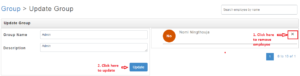 Image2
