How to apply leave by your supervisor on your behalf of your staff?
For those employees who could not apply leaves through the mobile application, their manager can apply leave on behalf of the employee. To apply leave by the supervisor, follow the below steps –
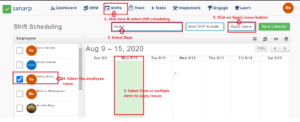
Step1: Login to www.sanarp.com and Navigate to Shifts- Shift Scheduling
Step2: Select the Department of the employee for which leave needs to apply.
Step3: Select a date or multiple dates (Ensure no shifts are added for the employee)
Step4: Select the employee name
Step5: Click on the “Apply Leave” button. A pop up page will appear.
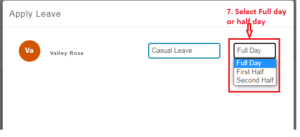
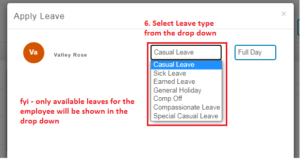
Step6: Select the Leave Type – Casual Leave/ Sick Leave/ Earned Leave, etc (Fyi – only the available leaves of the employee will be displayed in the drop down.)
Step7: Select if you want to apply for “Full/ First Half/ Second Half” day leave.
Step8: Click on “Apply Leave” to successfully apply for the leave.