
How to view Rejected Leaves in Sanarp Web Application?
Step1: Login to http://www.sanarp.com
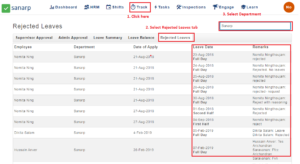
Step2: Navigate to Track – Leave
Step3: Select the Rejected Leaves tab and select the Department from the drop-down.
Step4: It will display the leave balance for the entire department.
Note: An employee can see its own leaves rejected from the Sanarp mobile application under Leaves.
