How to view Leave Balance in Sanarp Web Application?
Leave Balance will display all the leave status (Incurred, Taken, Balance). To see the leave balance for an employee, follow the steps below –
Step1: Login to www.sanarp.com
Step2: Navigate to Track – Leave
Step3: Select the Leave Balance tab and select the Department from the drop-down.
Step4: It will display the leave balance for the entire department. Refer Image1
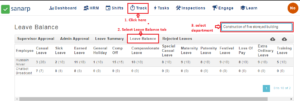 Image1
Step5: To see the Leave Balance of a specific employee, click on the “Employee name” and a pop-up page will appear.
Step6: To see the Leave Balance of a specific employee, click on the “Employee name” and a pop-up page will appear. Refer Image2
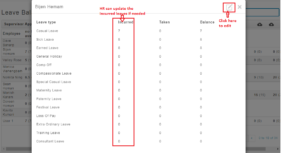 Image2
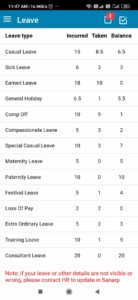
Note: An employee can see its own leave balance from the Sanarp mobile application under Leaves. If leaves are not visible for an employee, then Please contact the HR.