
How do we verify Email ID for Login Access?
Once the Admin assign the user role and send the “Verify email link”, the employee you will get an Email ID verification mail from Sanarp.
To verify the email, follow the below steps-
1. Login to your Email Id inbox
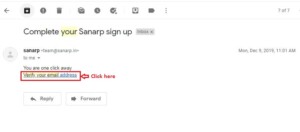
2. You will get an email from Sanarp with “Complete your Sanarp sign up” sub.
3. Open it and click on “Verify your email address”
4. You will be prompted to set password. The password should be min 8 character with atleast 1 digit, 1 special character, 1 uppercase.
5. Set the password and click sign in.
6. Once done, you are ready to use Sanarp.
