How to create tax for your hotel?
Step1: Login to https://www.sanarp.com/
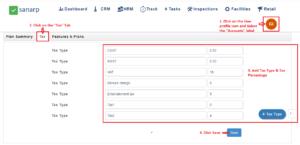
Step2: Navigate to User profile icon -> Accounts
Step3: Once in the Accounts page, click the “Tax” tab
Step4: Add the “Tax Type” and “Tax Percentage”
Step5: To add new tax, Click “+ Tax Type” and add the Tax Type” & “Tax Percentage”.
Step6: Click “Save”