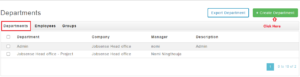
How to create a new new department?
Departments need to be created before adding any employees. To create a new department, follow the below steps-
Step1: Login into www.sanarp.com
Step2: Navigate to HRM – Department
Step3: Click on “Create Department” button
Step4: Enter the details – Department name, Description, Address, etc
Step5: Click on the Save button to complete the creation.
Step6: On successfully saving, the department will be created and listed in the department listing page.