
How to do Inspection/ Digital Checklist?
Digital Inspections/ Checklist can be done from both Sanarp Mobile Application and Sanarp Web Application.
To do Inspection in Sanarp Mobile Application, follow the below steps-
Step1: Log in to www.sanarp.com
Step2: Navigate to Inspection from Menu, click on “Inspections” tab.
Step3: Once in the Inspection page, Add “Location” and fill up the inspection questions.
Step4: Click on Remarks and add remarks, if any.
Step5: Click on Submit to successfully submit the inspection. (Refer Image1 below)
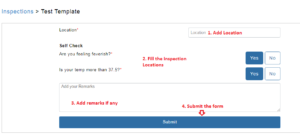 Image1
