
How to Download/ Export Inspection Report?
Inspection Reports can be viewed and downloaded from Sanarp Web Application. To download Inspection Report, follow the below steps-
Step1: Log in to www.sanarp.com
Step2: Navigate to Inspections from Menu, click on Inspections Reports.
Step3: Click on the Export Report button on the L.H.S. (Refer Image1)
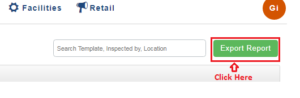 Image1
Step4: On clicking, a page will pop-up.
Step5: In the pop-up, Search the Template name and select the template to download.
Step6: Select the Date Range. A single date can be selected (E.g 4th June) or a date range of maximum 7 days (Eg. 29th May to 4th June)
Step7: On clicking the “Export” button, the report will be automatically downloaded for the selected date(s). (Refer Image2)
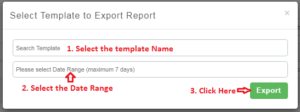 Image2
