Process for Hotel Users to Submit the Material Creation & Extension Form
Step1: MDM/ Procurement team shares the Material Creation & Extension Form to the hotels’ users through email or individually– Material Creation & Extension Form (gingerhotels.com)
Step 2: The hotel users/ Staff opens the form link to fill the form.
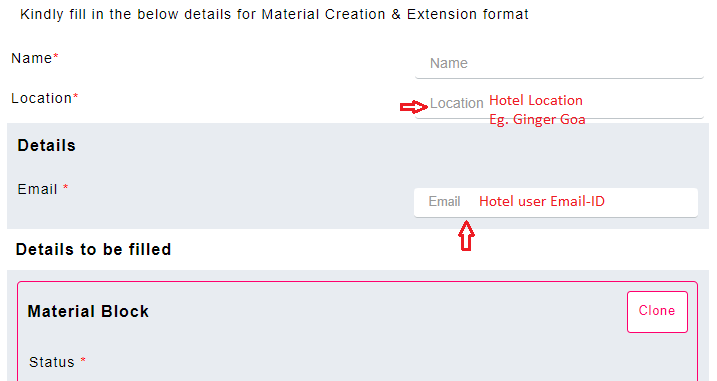
Step 3: Hotel user fills their Hotel Location and correct Email-ID.
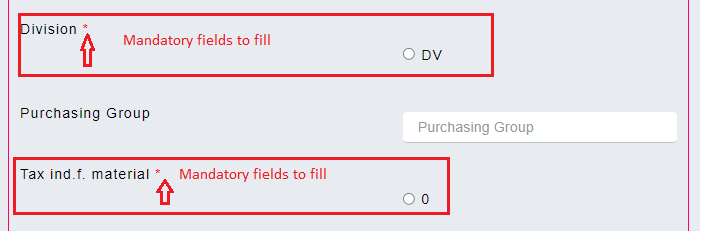
Step 4: Hotel user fills all the necessary remaining fields including the mandatory fields * (refer snapshot)
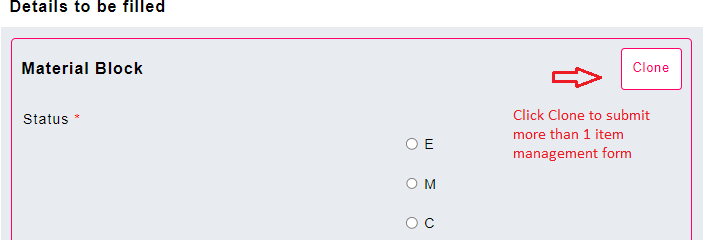
Step 5: If more than one item request under the same material group need to request, user can click “Clone” button to duplicate the form.
Step 6: User reviews the fields filled and submit the form.
Step 7: On the other side, the procurement team/ MDM receives an email or notification for the new form submitted.
Step 8: The procurement team/ MDM login into the Sanarp application and reviews the Material Creation & Extension Form.
Step 9: MDM opens the report and review the Item form submitted.
- Verify the details in the form.
- If the details filled by the user is correct, select Approve. If the details filled by the user is incorrect, select Reject.
- Put the Remarks accordingly.
- Select the checkbox “Send email to guest” to email the mail provided
- Click on the “Submit” button
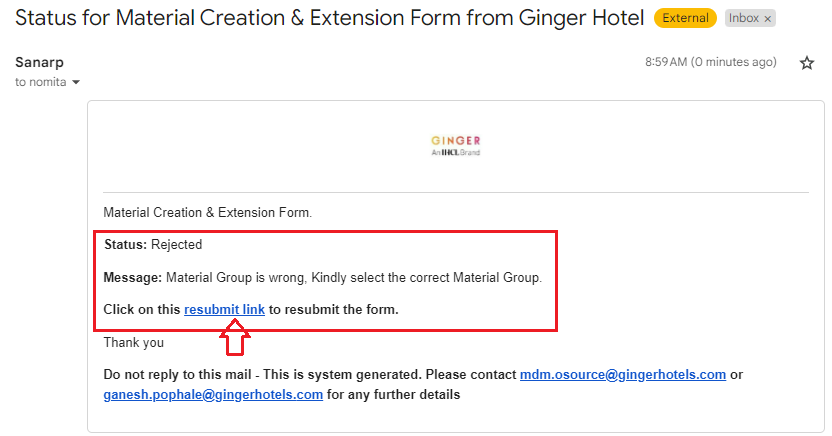
Step 10. Hotel users will receive an email if the Material Creation & Extension Form submitted is rejected with the remarks.
Step 11: Hotel users open the email, click on “Resubmit link” (refer below screenshot) and re-submit the Material Creation & Extension Form with the correct details to the MDM.