
How to View an Inspection Report?
The Inspection Report completed by the staff/ guests can be seen under Inspection Reports in Sanarp Web Application. To view reports, follow the below steps –
Step1: Log in to www.sanarp.com
Step2: Navigate to Inspections from Menu, click on Inspections Reports. Refer Image1
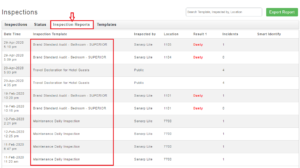 Image1
Step3: In the Search Inspection Bar, search the report by – Any digit, Template name, Inspected by, Location field to search the template and view the report. Refer Image2
Step4: Select the template and on opening it, the reports can be seen.
Step5: To reset your search, click on the Reset button next to Inspections on the upper left corner.
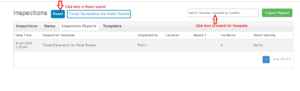 Image2
