
How to Reset Password for My Account?
If you forget your password, you can reset your password easily. To reset password follow the below steps –
Step1: Go to https://www.sanarp.com/ and click on “Login” button
Step2: Click on the Forgot password button. (Refer Image1)
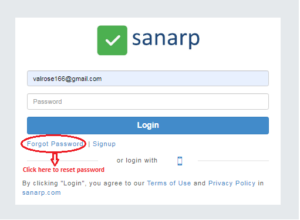 Image1
Step3: Enter your email address and click on Send a link to reset password button.(Refer Image2)
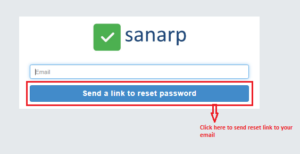 Image2
Step4: A password reset link will be automatically sent to your email.
Step5: Click on the Reset Password link.
Step6: Enter a new password and click on the Reset Password button to complete reset. (Refer Image3 )
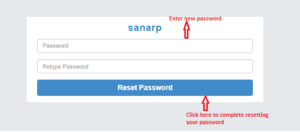 Image3
