
How to send automatic notification / communicate to guest when room is ready?
Guest communication/ notification can send to their email when room is ready. To do that, one time setting has to be done for Guest inspection form (Public) where guest email id is captured.
Steps to allow guest communication (one time setting) are given below –
Step1: Login to https://www.sanarp.com/
Step2: Navigate to Inspection -> Inspection Reports
Step3: Select the inspection template that you want to set Guest communication field, click on edit button and go to edit mode.
Step4: In the Inspection question add page, for the inspection question where there is Guest email, select the “Guest Communication Field” as Yes and save it. Refer Image1
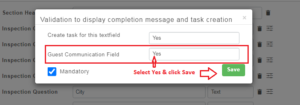 Fig: Image1
Step5: Once this is done, for any update the staff does in the Inspection form for this particular form, an email notification will be sent to the guest email.
Usecase:
Step1: Let’s say, Guest fills up the Guest Registration form and submits it.
Step2: On the hotel side, the staff reviews the Guest Registration form submitted by guest. When all the details are reviewed, Under staff review section, the staff put remarks – “Your Room 201 is ready. Please pick up the room key from the reception” and saved it. Refer Image2
Step3: On successful saving, an email will be automatically sent to guest email with the message “Your Room 201 is ready. Please pick up the room key from the reception”
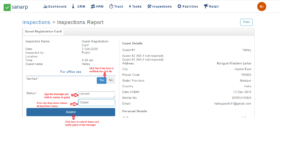 Fig: Image2
