
How do we add the Guest Additional fields for F&B?
To add additional fields such as Vehicle No, F&B pick up timing or COD for F&B ordering, follow the below steps to add the details by the Staff-
Step1: Navigate to Facilities -> F&B Items
Step2: Select the Restaurant you want to add the additional fields.
Step3: For the “Guest Additional Field” add the Text you want to display. For. eg. If I want to add Vehicle No or Pick up time, I can add the text as “Pick-up Time, Vehicle No”
Step4: To add options like Take away or Dine-in, you can add the multi-choice under “Selection Field Value” For e.g. Put Selection Field Value 1 as Take Away , Selection Field Value 2 as Dine-in
Step5: Click on “Save & Next” to successfully save the details.
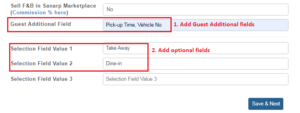
Image1: Staff add Guest Additional Field
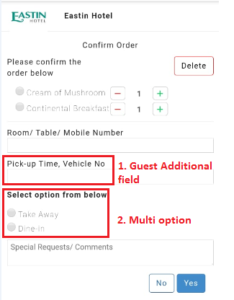 Image2: Additional field displaying at the Guest F&B order page
