
How to activate bulk email account for the Hotel?
To activate the bulk email account for the Hotel, the hotel has to set up the retail page first. Kindly follow the below steps to set up-
1. Advise the hotel to create a product to send bulk email for marketing campaign.
2. Once created, ask the hotel to click at the “Horn/ broadcast” icon.
3. On clicking the “Horn/ broadcast” icon, it will be take to the email verify page.
4. Enter the “Email” from which you want to send the email and click on “Verify email” button. Refer Image1.
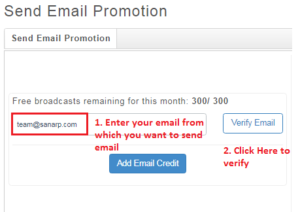 Fig1: Image1
5. Once done, Sanarp team will verify and activate the hotel email id.
