
How to Generate Retail Link?
Setting up your retail store after the products are added is fast and simple. To generate the retail store link, follow the steps –
Step1: Login to https://www.sanarp.com/
Step2: Navigate to Retail -> Retail Page (Refer Image1)

Image1
Step3: Update the Retail Set Up details (Refer Image2)
- WhatsApp No – this should be the Sales/ Reservation WhatsApp Number who will be the Point of Contact for taking orders.
- Sales Contact Email – this should be the Sales/ Reservation Email ID who will be the receiving for taking orders.
- Update Cover Image
Step4: Click on the “Generate” button.
Step5: On successful generation, Retail Page URL will be generated and QR Code can be downloaded.
Step6: The Retail Page URL and QR Code can be shared to Guests to place any retail order.
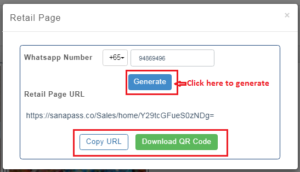 Image2
