How to Add/ Create a Retail Product Timeslot?
Multi-timeslot can be added for retail products for 1 day(s) or 1 month maximum. Multi-timeslot can be added –
- For a full day.
- For hourly timeslot.
fyi – Timeslot cannot be added for two Full days or a Full day and timeslot.
To add timeslot, follow the below steps-
1. To add for 1 month (+ Price for the month)
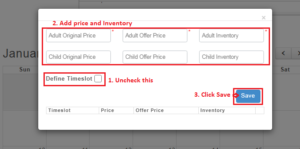
a. To add Full day timeslot
- Click on + Price for the month
- Uncheck “Define Timeslot”
- Add the Adult Original Price, Adult Offer Price, Adult Inventory
- Add the Child Original Price, Child Offer Price, Child Inventory (if applicable)
- Click “Save”
- Click “Create Product”
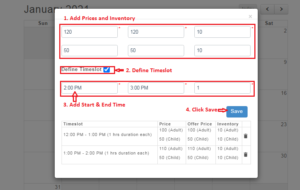
2. To add for selected dates (+ Price)
- Select few dates to add price
- Click on “+Price” button
- Add the Adult Original Price, Adult Offer Price, Adult Inventory
- Add the Child Original Price, Child Offer Price, Child Inventory (if applicable)
- Select “Define Timeslot” checkbox
- Add Start time and End Time (End Time should be greater than Start Time E.g Timing can be put as Start Time – 12:00 PM; End Time – 3:00 PM)
- Duration in hrs will be auto-calculated
- Click “Save”
- Repeat the steps 3 to 8 to add multi-timeslot.
- Close the pop-up and Click “Create Product” to successfully create the product.