
How to set up the CRM fields mapping for Guest Registration card?
Mapping the CRM fields to the Guest Registration Card will help to automatically capture the guest details such as –
- Guest First Name
- Guest Last Name
- Guest Email ID
- Guest Mobile No
- Guest City
while the guests are filling up the form during their check-in.
To map the field value, follow the below steps-
1. Click on the Edit button for the Guest Registration Form to edit.
2. Click on “Save & Next”
3. Once in the Inspection question page, For the below labels, select the corresponding response type and save (Refer Image1)
- Guest First Name – First Name
- Guest Last Name – Last Name
- Guest Email ID – Email ID
- Guest Mobile No – Mobile No
- Guest City – City
4. Click on “Save & Next” and then Update.
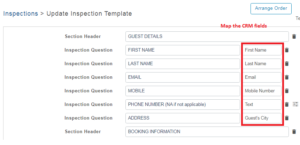
Fig: Image1
