How do we do Promotion/Marketing Campaign in Sanarp?
Sanarp marketing campaign is easy yet a very useful feature to do target marketing to your guest.
These marketing campaigns can be done easily in Sanarp by following these few steps to target the right customer/ guests for each promotions.
To start, follow the below steps-
Step1: Login to https://www.sanarp.com/
Step2: Check if your CRM (Guest details are imported already). If not, follow the help file to import CRM guests details – https://help.sanarp.com/?article=crm-add-crm-guest-list
Step3: Once step2 is completed, You are ready to start the marketing campaign.
Step4: To do, Navigate to Retail and open the retail active products.
Step5: For a product you wish to promote, on the right bottom corner of the product item, click on the blue microphone icon button. (Refer Image1 – Start Campaign)
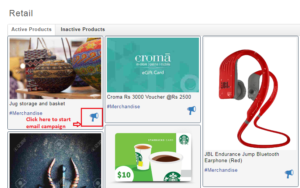 Fig: Image1 – Start Campaign
Step6: It will get open the product marketing/ promotion page.
Step7: On the left hand side of the page, do a one time set up (if not already done) to set up your email address from which the promotion needs to be sent. Refer Image2 – add sender email
For e.g. enter [email protected] and click on “Email Verify” button. An email verification will be sent to the user. At the same time, this email will be sent for verification to Sanarp team to add in our email campaign.
Once added successfully and activated, the employee is ready to start the email campaign.
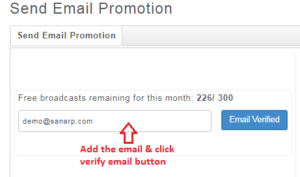 Fig: Image2 – add sender email
Step8: Now add the other fields-
a. Email count field – Search the labels/ tags that you have given during guest details (CRM) import. E.g if the promotion will be beneficial to the business guests , you can choose the “Business” label from the drop-down. You can select up-to 5 labels for this and only distinct email address will be counted to send the promotion.
b. Email Subject – Enter the promotion subject for the product
c. Click on “Send Email”. Once done, this promotion will be sent to all. Refer Image3 – Send email
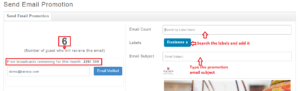 Fig: Image3 – Send email
For the Guest side:
On the guest/ customer inbox, the below promotion can be seen –
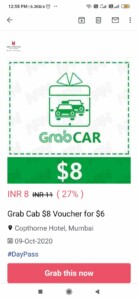
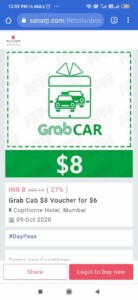
Click on the “Grab this now” button and it will take you to the product order page. You can login and click buy now to buy the product.