
How to Create an Event?
Creating events in a hotel or nearby the hotel is easy. To create events, follow the below steps-
Step1: Login to www.sanarp.com
Step2: Once logged in go to https://sanarp.com/Rewards/Createevents
Step3: Add event name on the Title field.
Step4: Click on the Choose File button to upload an image and add a brief description on the Description field.
Step5: On the Web Link field enter the event link (if any) and enter the date on which the event will be over on the Expiry Date field. (Refer Image1)
Step6: Select location and click on “Create” button to complete event creation.
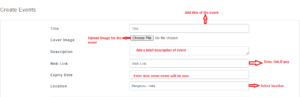 Image1
