How to Assign Supervisor or Reporting Manager to an employees?
Employees will be assigned Supervisor/Reporting Manager. Assigning supervisor can be done in 2 ways.
A. Assigning Supervisor/Reporting Manager for an employee
Step1: Login to www.sanarp.com
Step2: Navigate to HRM – Employees
1.In the Employee Search bar, search the employee name and open the employee profile.
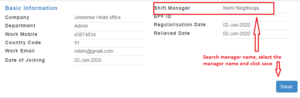
2. In the employee Basic Information Page, find the “Shift Manager” label and search the Manager Name and update it.
3. Click on the “Save” button to successfully assign the shift manager.
B. Assigning Supervisor/Reporting Manager for multiple employees
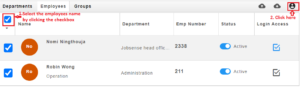
1.In the Employees listing page, Select the “checkbox” on the L.H.S of Name label to select all the employees names
2.Then, Click on the person Icon on the R.H.S. Refer image3
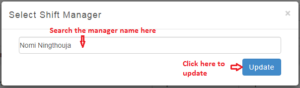
3.On clicking, a page will pop-up. Search the “Manager” name in the search box and click “Update” to successfully update the Shift Manager/ Reporting Manager. Refer Image4