
How to Download/ Export Employees?
All employees added in the employees listing page can be easily exported. Follow the below steps to export the employees-
Step1: Login to www.sanarp.com
Step2: Navigate to HRM – Employees
Step3: Click on the “Export” button (the cloud icon) just below the create employee button. Refer Image1
Step4: On clicking, the employee list will be Exported/ Downloaded.
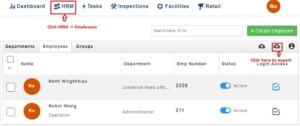 Image2
