
How to Update/ Edit an Existing Template?
To update an existing template, follow the below steps –
Step1: Log in to www.sanarp.com
Step2: Navigate to Inspections from Menu, click on “Templates”.
Step3: For the template you want to update, click on the “Edit ” button to edit the template. (Refer Image1)
Step4: Make the changes and click on “Save & Next”
Step5: In the Staff Section, for the changes you want to update, make the changes and click on “Update Template”
Step5: Once updated successfully, the changes will be reflected in the template.
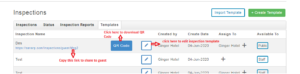 Image1
