
How to make your seller product services available for other Hotels
Seller Agreement
1.Login to https://sanarp.com/ with seller account details (service provider)
2.Navigate to F&B -> Create restaurant. e.g Say you have created BB Pizza (click on the edit icon)
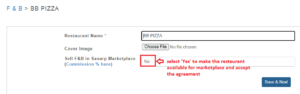 3.Select “Sell F&B in Sanarp Marketplace:” as ” Yes”
4.Accept the agreement by clicking the “Agree” button
Reseller Agreement
To import products or Restaurant from Marketplace
1. Login to https://sanarp.com/ with Hotel Account
2. To import Restaurants, Navigate to Facilities -> F&B Items
3. Click on the “Marketplace” tab and accept the agreement
4. Click on “Import Restaurant” and you will see all restaurant available for import.
5. You can view the menu first by clicking on the View icon or directly import.
6. To import, click on “Import” button and define the commission % and confirm.
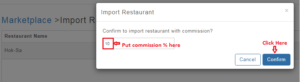
7. Once done, the imported restaurant will be available for your hotel and your guests can start ordering
Note: For the retail also, any marketplace products can be imported by following the above steps.
