
How to create a Task?
This document will walk-through how to create a task in Sanarp Web Application. To create a task, follow the steps below-
- Login into www.Sanarp.com
- Navigate to Tasks Tab -> Tasks
- Click on “+ Create Task” button
- Fill the Details –
- Task Name
- Status – Open, In Progress, Closed. Choose Open at the time creating new Task
- Priority – Low, Medium, High
- Description
- Send To – Any employees you need to assign the task, you can add here. The employees should have an active account to assign the task.
- Image (Optional)
- Click on “Create Task” to complete the task creation
- On successful creation, the task created will be listed in the task listing page. Refer below screenshot 1
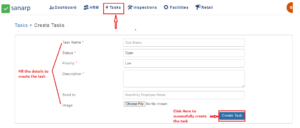 Fig: Screenshot 1
