
How to Close a Task?
Once a task is completed, the task has to be closed. To close a task, follow the below steps-
- Login to www.sanarp.com
- Navigate to Tasks Tab -> Tasks
- For the task you want to close, click on the task name.
- Once the Task page is opened, change the Task Status to Closed and click on “Update Task”.
- On successful update, the tasked will be updated as Closed.
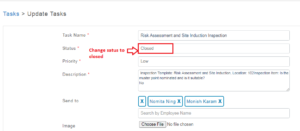 Fig: Screenshot1
