
How to Assign a Task or Add Send To?
To add “Assign To” for the task, follow the steps given below.
- Login into www.Sanarp.com
- Navigate to Tasks Tab -> Tasks
- For the task you want to add more Assignee/ Employees, Click on the “+ “ sign under Assign To button.
- A pop up will appear. On the search employee box, search the employee name you want to add and click on “Save“. If a pop-up page doesn’t appear, it will take you to the edit page, where you can search and add the employee name under the Sent To label.
- On successful save, the task will also be assigned to the new employee added.
NB: To add the employee, the employee should have login access to Sanarp
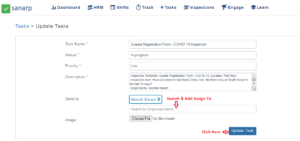 Fig: Screenshot1
