
How do an employee create amenities in Sanarp?
Hotel amenities can be created easily in Sanarp. These amenities can be made available for guest to order/ buy.
To create amenities for the hotel follow the below steps –
Step1: Login to https://www.sanarp.com/
Step2: Navigate to Facilities -> Amenities
Step3: Add Section Header (For Eg. Bedroom) and click on the “Save” button. On successfully saving, the Amenity Section will be automatically added.
Step4: Add Amenity item (For Eg. Hand Towel)
- Add Amenity Item title
- Add Item Photo (Optional and add image size < 500 MB)
- Add price
- Description (optional)
Step5: Click on the “Save” button to save the amenity created.
Step6: To add more amenities, click on “+ Amenity Item” on the bottom right corner and you can also enter the number of amenity fields you wish to add.
Step7: To add the next section header, Click on “+ Section” and then click “Save”. (Refer Image 1)
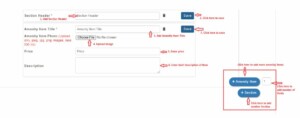 Fig: Image 1
