How to generate bill by Staff and send invoice to Guest?
Once guests orders are delivered by staff, bill needs to generate and send the invoice link to guest for online payment. To generate the invoice, follow the below steps-
Step1: Login to www.Sanarp.com
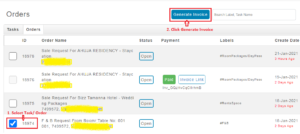
Step2: Navigate to Tasks -> Orders tab
Step3: For the order you need to generate the bill, select the order and click on “Generate Invoice” button.
fyi – you can select multiple orders (from the same guest) to generate as 1 invoice.
step4: A pop-up will appear.
a. Click on “Send Invoice Link” button to send the invoice link to guest
b. If you want to print the invoice before bill payment by guests, click on “Print” button and it will take to the print page
Step5: Once Invoice is sent, Guest can check for the invoice link in the inbox of the login mobile number or email id to do the payment.
Step6: Once payment is done, the Guests can take snapshot of their bill receipt or download and save as pdf.
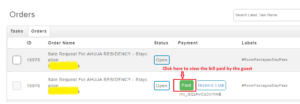
Step7: Staff can view the bill settlement by clicking on “Paid” button.