
How do I apply the F&B order setting so that only my F&B department gets the order request?
F&B Task mapping is to ensure that whenever a guest orders from the F&B menu a staff or a group of staff gets notified of the order. To do the staff mapping-
Step1: Login to https://www.sanarp.com/
Step2: Navigate to Tasks -> Orders
Step3: Once in the Orders page, on the extreme R.H.S icon. On clicking, it will take you to the F&B task mapping page. (Refer Image 1- F&B Task Mapping)
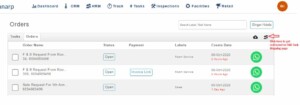 Fig: Image 1- F&B Task Mapping
Step4: On the search box “Search by Employee Name”, type the employee’s name and add the employee.
Step5: Click on the “Assign Employee” button to successfully add/ assign the employee.(Refer Image 2- F&B Employee Assign)
Step6: Once completed, the employee will be notified in Sanarp mobile app and email for any new F&B order placed.
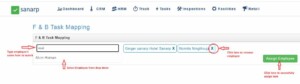 Fig: Image 2- F&B Employee Assign
