
How to create an Employee?
After sign up, new staff/ employees needs to be added. To add new staff/ employees, follow the below steps
Step 1: Login into https://5gpromise.gingerhotels.com/
Step 2: Navigate to HRM – Employees
Step 3: Click on “Create Employees“
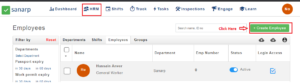 Fig: Screenshot1
Step 4: Fill the details
- First Name
- Last Name
- Job Title
- Employee Number (not editable)
- Department
- Work Email (If work email is not available at the moment, put a dummy email for the time being)
Step 5: Click on “Save” Button
Step 6: On successfully saving, the employee will be created and can be seen in the employee listing page.
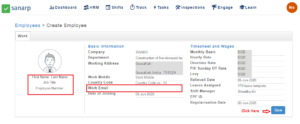 Fig: Screenshot2
