
How to update an existing Task?
An existing task can be updated easily. To update a task, follow the steps below –
- Login to www.sanarp.com
- Navigate to Tasks Tab -> Tasks
- For the task you want to update, click on the task name.
- The task will open in edit mode.
- You can edit/ update the details, change status – In Progress/ Closed, add images, add Send To/ Assign to (if needed) and click on “Update Task” button.
- On successful update, the latest changes will be reflected in the task. Refer Screenshot1
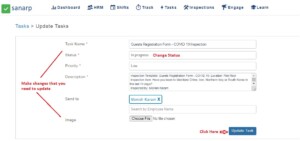 Fig: Screenshot1
